Phishing Scams
IT will NEVER ask you for your password, and you should never give your password to anyone. Ignore any email message asking for your password.What is phishing?
Phishing is a scam where fraudsters attempt to trick users into divulging personal or financial information such as usernames, passwords, social security numbers, birth dates, pin numbers and credit card/account numbers. Many phishing attempts come as email, but other forms include phone calls, text messages, and web browser pop-ups.
Phishing scams attempt to look like legitimate messages from a trusted party such as a financial institution, credit card company, or even Computer User Services here at Reed. Many are emails asking you to urgently update your account or verify your identity. The email may contain company or college logos and a seemingly legitimate link to a website identical to that of the claimed sender. Don't take the bait or your personal information will be at stake!
How to protect yourself
- Never reply to a suspect message!
- Don't click on the web link or use the phone number provided in the message
- Hover your mouse over the link in the message and see if it redirects you to a different website. If so, be suspicious.
- Confirm the legitimacy of the message through other means:
- Use an existing bookmark or manually type in the known web address yourself
- In the case of a financial institution, use the customer service phone number listed on your paper statement or on the back of your credit card
- Always use a secure website when submitting credit card numbers or other sensitive information in a web browser (look for a security lock in the address bar and a URL that starts with "https://")
- Check the validity of a website using Google's Transparency Report tool: https://transparencyreport.google.com/safe-browsing/search
- Check statements regularly for unauthorized transactions
- Use different passwords for each account that is tied to financial or sensitive information (ie, banking, credit cards, etc).
- Look for the prefix "idp" followed by ".reed.edu". If your URL is in another format, it is not likely an official Reed link and should be reported as phishing.
How to Report Phishing
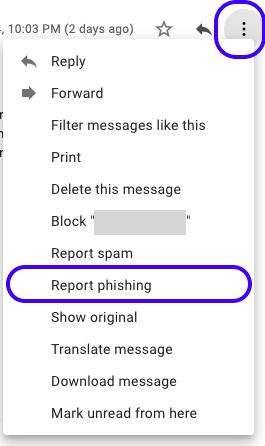
In Gmail (mail.reed.edu), view the offending message. In the top right of the message screen, you'll find an arrow (the "Reply" button) and to the right of that is a set of three dots. Click this to access an options menu, and select the "Report Phishing" option.
For more information, please visit our webpage on reporting spam and phishing scams.
If you ever have doubt about the legitimacy of a message you have received, contact Computer User Services at x7525 or contact cybersecurity@reed.edu!
Additional Resources
Identify Email Attacks & Hoaxes: Guidelines to follow when you suspect email viruses, worms, spam, or other attacks
https://www.reed.edu/it/help/email-hoax.html
Anti-Phishing Training Game: An interactive game that teaches you how to identify phishing emails
https://phishingquiz.withgoogle.com/
FTC: Identity Theft
https://www.ftc.gov/bcp/edu/microsites/idtheft/
Check the Validity of a Website: Google's Transparency Report tool lets you see if a website is legitimate and safe to use
https://transparencyreport.google.com/safe-browsing/search
If you have questions or concerns, email the CUS Help Desk or call us at x7525.