Help Desk

Information Technology

Duo Verified Push

Duo Verified Push is coming to Reed in August. Learn more below.

Duo Verified Push makes multi-factor authentication more secure and further protects against compromised accounts. With the traditional push notification, users simply Accept or Deny the Duo request on their mobile device. This can lead to push fatigue or accidental Accept response. 

Duo Verified Push stops these attacks by displaying a 3-digit code on the Duo webpage which the user then enters in the mobile app (as opposed to tapping "accept"). This ensures only verified users are able to login while preventing accidental approvals.

Why Is Reed Doing This?

Even with multi-factor authentication enabled at Reed, accounts can still be compromised. This extra verification step is a tool to help thwart hackers and keep college data safe.

Consider this real-world example... A phisher sets up a fake webpage with an identical-looking Reed login page. You enter your Reed username and password on the fake login page, effectively handing over your login credentials to the phisher. Now, the phisher uses those same credentials to immediately log into a real Reed website (such as IRIS), which then sends a Duo push to your phone. You accept the request, thinking you received it because you were just trying to log into (what turned out to be a fake) Reed website. Now the phisher has full access to your Reed account--can read/send emails, access your Google Drive files, see your W-2 through Employee Self-Service, etc.
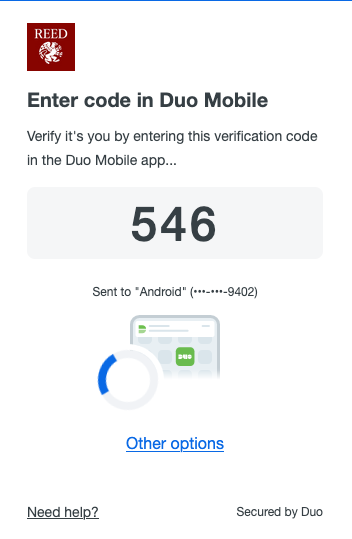
What Does Duo Verified Push Look Like?

With Duo Verified Push, users will be presented with a 3-digit code:

Duo Verified Push Code

At this point, enter the three digit code in the Duo Mobile app on your device. That's it!

How Does This Impact Other Duo Methods?

The change to Duo Verified Push has no impact on other Duo methods. Hardware tokens, passcodes from the Mobile App, SMS, and phone call options will still work. Using Duo Push with the mobile app is still our recommended method at Reed.

Can I still Remember Duo for 30 Days on Trusted Devices?

Yes! You still have the option to remember Duo on trusted devices. When selecting this option, you won't be prompted with Duo for another 30 days (this is a per browser, per device setting).