Multilingual LaTeX with the Babel Package
- Declaring the Package
- Switching Between Languages
- Unicode
- Russian
- Chinese, Japanese and Korean
- Ancient Greek
- International Phonetic Alphabet
Declaring the Package
LaTeX makes it easy to typeset foreign languages using the babel package. This package is found in most default installations of LaTeX.
Like all packages, you must declare that you will be using it in your document's preamble. You also need to list the languages you want in square brackets, listing first the language the bulk of your text is written in:
\usepackage[spanish,french,english]{babel}After changing the languages in the preamble, you may need to trash your .aux files.
If you wish to use only German or French, there are separate packages (non- babel) that you may use. This streamlines the commands for punctuation and typesetting in slightly better ways than babel does, but you are restricted to the one language loaded. For an in-depth explanation of the usage of the packages german.sty or french.sty, see the book A Guide to LaTeX by Helmut Kopka and Patrick Daly.
back to topSwitching Between Languages
There are a few ways to switch between languages. If you wish to use all the features that babel gives you, then you should switch using the command \selectlanguage{language}. To avoid confusion with various other independent packages, some languages' names in babel are different than what you might expect:
- Spanish = spanish
- French = francais
- German = germanb
Flowers often have nectar, oil, or pollen rewards for visitors, and it is to the flower's benefit if the animal that takes the reward is likely to transfer its pollen between flowers of the same species.The command \foreignlanguage{language}{text} and the otherlanguage* environment are to be used when you don't need the special commands or most of the bells and whistles enabled by babel. These are perfect for when you need only a short span of text in another language. For example:
\selectlanguage{spanish}
Las flores tienen a menudo recompensas del n\'ectar, del aceite o del polen por visitantes, y es a la ventaja de la flor si el animal que toma la recompensa es probable transferir su polen entre las flores de la misma especie.
\selectlanguage{english}
\begin{otherlanguage*}{francais}back to top
Les fleurs ont souvent des r\'ecompenses de nectar, de p\'etrole ou de pollen pour des visiteurs, et il est \`a l'avantage de la fleur si l'animal que prend la r\'ecompense est susceptible de transf\'erer son pollen entre les fleurs de m\^emes esp\`eces.
\end{otherlanguage*}
\foreignlanguage{germanb}{Nektar und Bl\"uenstaub sind Belohnugen f\"ur Best\"auber, die Blumen besuchen.}
Unicode
Unicode is a technology that standardizes the way computers encode text. Along with the babel package, you can use Unicode in your LaTeX documents to typeset text in non-Roman alphabets.
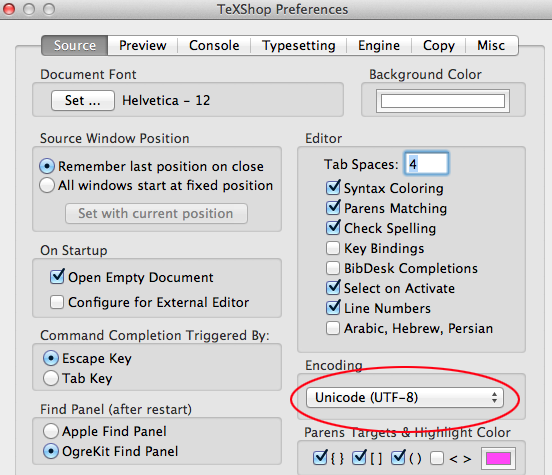
First you must make sure that your document is properly encoded. In TeXShop, go to File > Save As... and under "Encoding" choose " UTF-8 Unicode" (not "OSX Unicode"). You can change the default settings to make all your documents Unicode-capable in TeXShop > Preferences. On most modern varieties of Linux, text documents are by default UTF-8 encoded.
back to topRussian
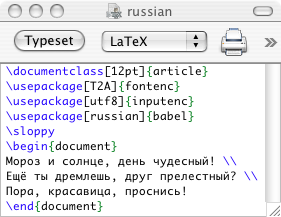
You need to declare that you will be using Unicode, as well as the languages with the babel package, in your document's preamble, as follows:
\usepackage[T2A]{fontenc}If you are using Russian, you may want to add the line \sloppy to your preamble to turn off hyphenation, because hyphenation in Russian in LaTeX is a problem.
\usepackage[utf8]{inputenc}
\usepackage[russian]{babel}
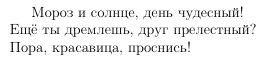
In your LaTeX document, enter your text in Unicode just as you normally would. You can enable the Unicode input methods in Mac OS X in your System Preferences under "International". Here is an example file and output in Russian:
back to top
Chinese, Japanese, and Korean
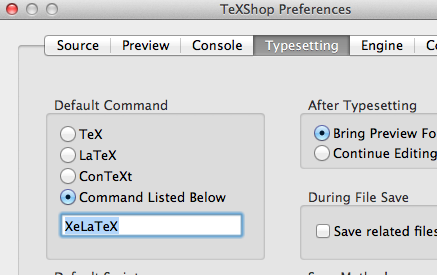
Installing the CJK package and cyberbit fonts is not for novices. An easier way to accommodate entering Asian-language text is to use the fontspec package with XeLaTeX. We will document XeLaTeX RSN. For now here's a simple example:
\documentclass[11pt]{article}
\usepackage[cm-default]{fontspec}
\begin{document}
Some plain old text. And now, some Chinese: {\fontspec{Kai} 你好吗}.
\end{document}
You need to declare that you will be using Unicode, as well as the CJK package, which enables you to input Chinese, Japanese, and Korean. We will also define a command as a shortcut to inputting CJK text, as follows:
\usepackage[encapsulated]{CJK}
\usepackage{ucs}
\usepackage[utf8]{inputenc}
\newcommand{\cjktext}[1]{\begin{CJK}{UTF8}{cyberbit}#1\end{CJK}}
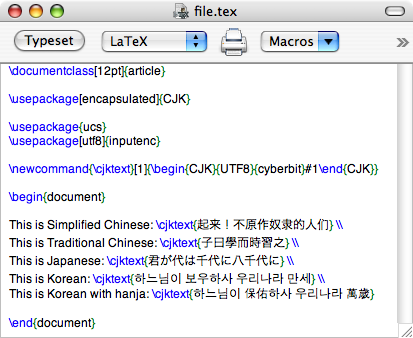
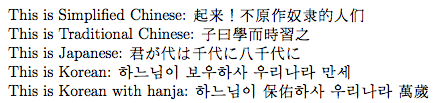
In your LaTeX document, when you want to use CJK, all you have to do is enter the \cjktext{} command and type the Chinese, Japanese, or Korean inside the braces. Here is an example file and output using CJK:
> 
Ancient Greek (Polytonic)
Obtaining the packages
Ancient Greek also makes use of the babel package, as well as another package called teubner, which will allow you to write Greek-specific diacritical marks and do other fancy typesetting things appropriate to the classics. You can download this package from CTAN at tex-archive/macros/latex/contrib/teubner/. Download the teubner.sty and teubner-doc.pdf files (you may need to right-click or control-click on the links to save them if unintelligible gibberish shows up in your browser).
Once you have downloaded the files, you will need to install the package in a place where TeX will be able to find it. If you plan on using the Greek in only one document, you can put it in the same folder as that document, and TeX will be happy when it goes to look for it. Otherwise, the more elegant solution is to put the package ( teubner.sty) file where it will be usable by all LaTeX documents on your computer:
- Mac OS X: ~/Library/texmf/tex/latex/teubner/teubner.sty
- Windows: \tex\latex\teubner\teubner.sty relative to your local texmf directory (usually C:\texmf)
- Linux: /usr/share/texmf-tetex/tex/latex/teubner/ (varies depending on distribution)
If these folders don't exist, you will have to create them. Additionally, on Windows you have the option of installing with the MiKTeX Package Manager, which can save you quite some time.
back to topWriting Ancient Greek LaTeX
As with other packages, you need to declare their use in the preamble as such:
\usepackage[polutonikogreek,english]{babel}Now, when you want to type in Greek, use the command \textgreek{}. Whatever you put in the braces comes out in Greek. For example:
\usepackage[or]{teubner}
\textgreek{\as sk\wci{} \es n \as ige\ia w---ko\ua rh d'' \es peb\ha set'' \as p\ha nhc}
An alternative method is to use the command \selectlanguage{greek}, which switches your document's input from English to Greek. This is useful if you have long sections of Greek, because you cannot use line breaks with the \textgreek{} command. To switch back to English, just use \selectlanguage{english}. For example:
\selectlanguage{greek} m\hc nin \asa eide je\ag{} Phlh\"{i}\aa dew ''Aqil\hc oc \\ o\us lom\ea nhn, \hrg{} mur\ia '' ''Aqaio\ic c \asa lge'' \esa jhke \\ poll\ag c d'' \is fj\ia mouc yuq\ag c '''A\"{i}di pro\"{i}\aa yen \\ \hr r\wa wn, a\us to\ug c d\eg{} \er l\wa ria te\uc qe k\ua nessin \\ \selectlanguage{english} Typing in Greek in \LaTeX{} is fun!
For a guide to the different commands you can use to produce the various diacritics, refer to the teubner-doc.pdf file you downloaded earlier, which can be found at the teubner download page. Pages 5 and 7 have especially useful tables. After a while, you get to know the commands so well you don't have to think about them too much.
back to topIPA
IPA functionality is provided by the tipa package, which can be downloaded from from this link to the CTAN website. You may also want to check out the LaTeX for Linguists web page.
back to top